
Storage Gateway
On-premises access to virtually unlimited cloud storage
SERVICE
CLOUD STORAGE & CONSOLE WEB
MY ROLE
DESIGN LEAD
DESIGN ROADMAP & STRATEGY
UX/UI DESIGN & PROTOTYPING
PLAN AND CONDUCT USER RESEARCH
USER RESEARCH ANALYSIS
TEAM
PRODUCT MANAGEMENT TEAM
FRONT END DEVELOPERS
DOCUMENTATION & CONTENTS TEAM
OVERVIEW
AWS Storage Gateway service is a set of hybrid cloud storage services that provide on-premises access to virtually unlimited cloud storage. Because of the nature of the service, we were getting the entry-level customers more and more and we had to find a new way to help them to have less learning curve throughout the journey.
I was the solo designer in the team and we didn't have any solid and ground understanding of our new customers and their experience.
PROCESS
All AWS Management Console need to be migrated to a new design system to provide the consistent and seamless experience for users at scale. Because once user uses one service, there's are high chance to use another AWS service along with it so it became important to speak the same design language to users.
While I started working on the migration first, I planned user research to find out the what's the biggest pain points for our users to apply the insights into new design.

Cross-functional alignment for strategic initiatives
I created a plan and led a key alignment with stakeholders to ensure we were all on the same page before the UX revamp. This proactive communication helped the team move forward effectively and plan ahead with a clear direction.

STEP 1. MIGRATION TO A NEW DESIGN SYSTEM
Migrating into a new design system is not just visual changes nor ‘Lift and Shift' but helping better user experiences, creating a unified and familiar user experience. This reduces the learning curve for users as they navigate between different services.
Migrating to a new design system is a complex undertaking that demands careful planning and execution.
A. Heuristic Evaluation to understand the current console usability issues
I wasn't familiar with Store Gateway console and wanted to learn and see what it needs to be improved from usability perspective so I used heuristic evaluation on Storage Gateway and shared the evaluation report with the entire team to share what we can improve from user experience perspective.
Also, I could identify usability issues can be solved by migration to a new design system through this analysis.
.png)
B. Identify where & what a new design system should be applied in old console & how these changes should be made
Secondly, I reviewed the old console design page by page and found out where we need to be migrated to a new design to be consistent with the AWS design principles and patterns.

C. Go through design review process with the central design team and iterate the feedback
I led the cross-functional team to go through the whole design review process from kick-off to fit and finish review and make sure our console is aligned with the new design system to deliver consistent and high quality experience for customers.

STEP 2. USER RESEARCH & ROADMAP
PLANNIG & CONDUCTING
I led the research from planning, getting participants, conducting sessions and analyze the research results and deeply collaborated with PM.

ANALYSIS
First of all, I used thematic analysis and tried to find the themes and patterns to identify and analyze the patterns within a dataset. This helps the find the main pain points and understand shared meanings and experience with the console.
Based on the analysis, I identify main themes and patterns on how our customers experience the Storage Gateway console and the themes were mixed among their needs, goals and pain points.


UX & PRODUCT ROADMAP & SCOPING
Based on the themes, I ran a working sessions with cross-functional teams and we defined UX & product roadmap to plan out how we can improve and apply this user insights and pain points so that we can provide a better console experience.
We categorized these themes into three buckets to scope;
1) Short-term incremental improvements
2) Mid-term improvement
3) Long-term framework-level changes

From here, the team decided to work on the mid-term scope which is about how we can make the onboarding process simpler and easier since this has been a critical problem to impact the new customers.
STEP 3. REDESIGNING ONBOARDING EXPERIENCE
DESIGN PRINCIPLES & OVERVIEW
Based on the user insights from the research, I defined three key design principles when we simplify the onboarding process.

USER FLOW DIAGRAM:
UNDERSTAND USER TASKS & EXSISTING ONBOARDING EXPERIENCE

< Onboarding flowchart >
UNDERSTAND USER'S MENTAL MOTEL AND MAJOR PAIN POINTS
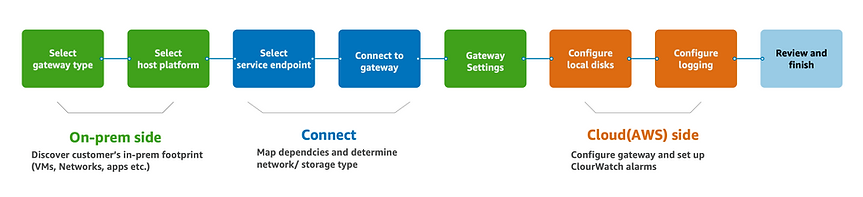
Through the user research and the flowchart, we learned that creating gateway flow can divide into big three categories based on the customer’s tasks and they do these tasks in order
; On-prem side tasks > Connect to Cloud > Cloud(AWS) side tasks.
We rearranged the existing steps to match to this task order and make the onboarding process more clearer and easy to learn.
We also learned that there are major friction points in creating a gateway so we ideated on how we can make those friction seamless and less disturbing.
KEY IMPROVEMENTS
1. From 8 steps to 4 steps in creating a gateway
We combined three steps into one step that happens in on-prem side together and rearranged the steps as user completes the tasks. This simplified the 8 steps into 4 steps in total.

2. Seamless experience between activation and configuration and clear guidance on 'how it works'
1) Redesigned steps on the left navigation on the wizard, matching to customer's tasks and mental model by arranging steps from activation to configuration in much shorter steps.

< Before >
< After >
2) Provide 'How it works' at the top so entry point users can learn about the whole process before they go through and help them to see what they need to prepare in advance with a step by step guide.
This ensuring users understood both the required actions and their purpose, ultimately streamlining their experience and enhancing task comprehension.
3. Quick launch EC2 instance, much simpler way to set up instance
Connecting to AWS EC2 instance was the biggest pain pain points in creating a new gateway because customer has to set up another service while they're doing onboarding to Storage Gateway.
We provide the 'Quick launch EC2 instance' option by minimizing inputs from users and make the setup experience less daunting while users still can set up advanced/ customized way.

< Before >
< After >
4. More readability & visually digestable instructions
Each platform option has own set up instructions but it was really hard to follow with outdated & not enough information. We updated each set up instruction more detailed & up-to-date information to make it easy to follow and create less friction between on-prem side and AWS cloud side.

< Before >
< After >
5. Guide users set up things upfront & make less friction along the way
Previously, customers requiring a hardware appliance had to interrupt onboarding to place an order. We've streamlined this by moving the hardware order to the beginning of the process, eliminating unnecessary back-and-forth navigation.

< Before >
< After >
Collaboration and communication as a solo designer
Storage gateway UX
-
A dedicated Wiki page for Storage Gateway has been created to document and share in-depth UX design and user research findings
-
Set up UX forum for in-depth discussion around UX subjects
UX Office Hours
-
Helped the team that doesn't have UX supports
-
Collected feedback on UX, UI design and customer research from cross-functional teams
Educate the team
#design-together Amazon
-
UX Design process
-
User research
-
Cross-functional workshop
-
Process to engage UX
-
Initiated across-Amazon Slack channel for solo designers and established monthly meetings to support each other
-
Fostered a community of knowledge sharing, including tips, experiences, and resource
LEARNINGS
Transitioning to B2B and cloud services presented a significant challenge, requiring me to quickly master a highly technical domain while operating as a solo designer.
I navigated a steep learning curve, mastering a complex technical domain and embracing the multifaceted role of a solo designer but like any challenge, this opportunity facilitated significant growth.
It was deeply satisfying to witness the team's growing appreciation for UX and its positive impact on both user experience and business outcomes. While these technical cloud services traditionally targeted experienced users, the increasing adoption across diverse industries underscored the critical need for improved accessibility and user-friendliness.