
Google Maps, Chat
Automatic FAQs
Help merchants to answer quickly to their customers
SURFACE
Mobile, Web
MY ROLE
DESIGN LEAD
CORE TEAM IDEATION WORKSHOP
DESIGN STRATEGY
PROTOTYPING & MOCK-UP
TEAM
USER RESEARCHER
PRODUCT MANAGER
SW ENGINEERS
OVERVIEW
Google wanted to help businesses by connecting customers easily to the business whenever they have questions or wanted to reach out.
Business Messages is a rich, asynchronous messaging service that enables users to engage with brands from a variety of entry points, including Google Search, Maps, Ads, and the brand's own channels.
This project was about enhancing this business message by providing some automatic features into Chat to help merchants can communicate effectively with their customers while they're taking care of hundreds other stuffs for their businesses. This aims to bridge the gap between consumers wanting quick answers and merchants wanting to provide answers faster and easier.
FAQs growth over time
The team has evolved the FAQ (Frequently Asked Questions) features from manual creation from merchants to streamline merchant workflows by adding automation features.
For this project, the team tried to integrate a bot to handle routine customer questions about business hours and basic business information and called 'Automated FAQs'

Key problems
Too much work for merchants to set up FAQs
Only 33% of merchants who initiate the FAQ flow proceed to create FAQs, indicating a substantial conversion drop-off. This suggests that the process is hindered by the need for merchants to manually author content and develop concepts independently.
Low number of FAQs impacts to consumer CTR
While we see strong correlation between # of FAQs and consumer CTR - merchants with 5+ FAQs see ~8 pts higher consumer CTR than merchants having <3 FAQs (data), 1/3 of FAQ adopted merchants have only 1 FAQ setup.
Questions we had
With adding the bot feature apart from the existing FAQs & automatic features in Chat, three questions raised and found the way to answer these questions.

PROJECT PROCESS
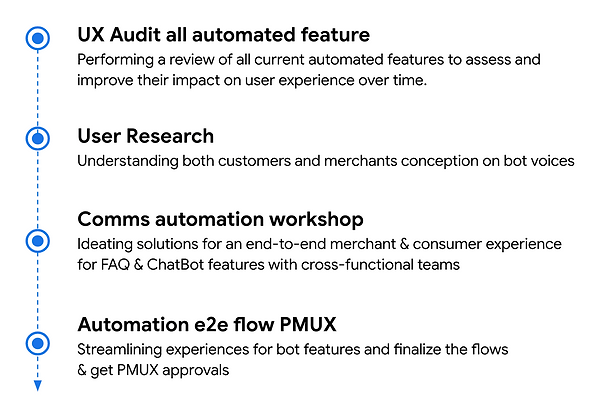
UX AUDIT - ENTIRE AUTOMATION FEATURE SET
I reviewed all existing automation features designed to improve merchant engagement, including Welcome Message, Conversation Starters, FAQs, Quick Replies, Smart Replies, Away Messages and see how all these will impact user experience when all these features are mixed along the user journey and see if there are any negative impacts for long-term user experience.
This makes the team recognized the need to shift focus on scope eventually.
AUDITING AUTOMATION FEATURES
Review all different automation features and see how they will impact the user experience in long-term
DRIVE ALIGNMENT ACROSS FUNCTIONS
>
Share the audit deck with the cross-functional leadership & advocate best direction for user experience


USER RESEARCH
To see which chatbot identity do they prefer between Google voice and Merchant voice and why is that, we conducted user research for both merchants and consumers.

KEY INSIGHTS & FINDINGS
We found out that there are important aspects that you have to consider when you design the interaction and the voice.

AUTOMATION CROSS-FUNCTIONAL WORKSHOP
Objectives
-
Find strategic solution to provide the consistent experience for FAQs and Bot features
-
Brainstorm end-to-end merchant & consumer experience for FAQs & Bot features, optimizing for merchant adoption & consumer satisfaction
Problem Statement & Challenge
HMW design a clear and simple experience for FAQ and chatbot features to
1) help merchants understand how these two features work together
2) provide consistent consumer interaction for commonly asked questions

DESIGN & PROTOTYPES
MERCHANT EXPERIENCE - OPT INTO AUTOMATIC FAQs
As we merging previous FAQ & ChatBot features, making them one setting for merchants was critical since we learned from the research that merchant has the mental model that they understand those two feature are the same.
1. Bot feature as 'Automatic FAQs'
We kept the previous manual FAQs as 'Custom FAQs' to match with merchant's expectations on the feature and put both under the same menu, 'Add FAQs'.
Mobile
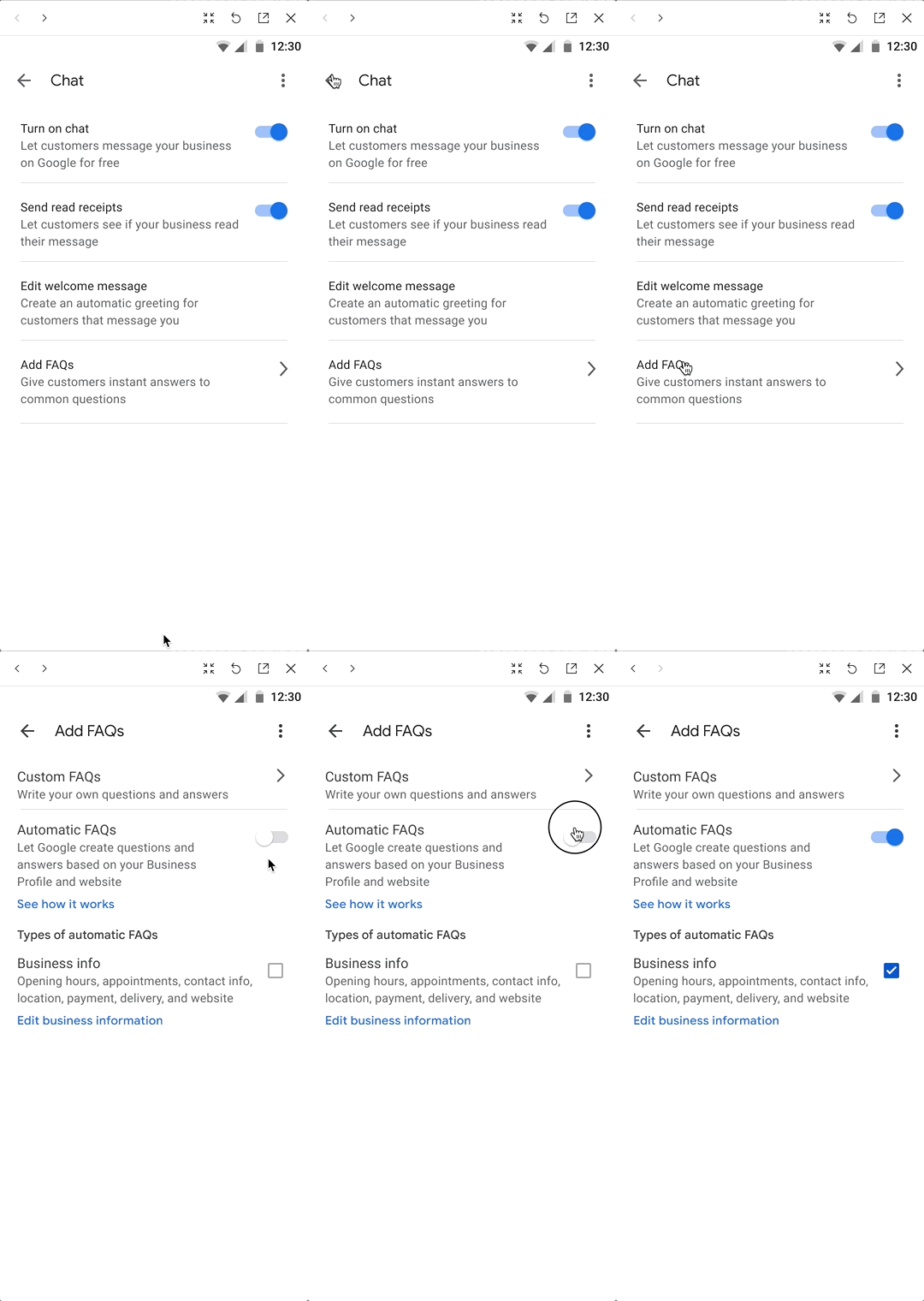
2. 'See how it works'
We also learned that merchants want to have the control and see how this feature would work with consumers and want to understand clearly.

CONSUMER EXPERIENCE - INTERACT WITH A BOT
1. Merchant voice with 'Automated response'
We used the merchant logo for the bot response to make less confusion for consumers and added the annotation, 'Automated response' next to the business name so consumers know that the information is based on what businesses provided but automatically answered by a bot.

2. Chip-based interaction for consumers
Previous FAQ features utilized a chip-based experience and we assume customers expect to have a different experience for the new bot feature.
However, user research indicated that merchants and consumers experienced difficulty distinguishing between these features, leading to confusion about their purpose. To ensure clear interaction and avoid further ambiguity, we decided to maintain the existing chip-based interface in conjunction with the new bot feature.


IMPACT

LEARNINGS
Key takeaways from this project, I always need a careful consideration for long-term vision on user experience when introducing new features and strategic rollout of new feature. Continuous feature addition, without a holistic view, doesn't necessarily equate to an improved user experience, especially the feature is new and not familiar to users.
Also, this project reminded me that the critical UX principle of prioritizing user feedback. Our assumption that merchants would readily embrace automated features was challenged by their expressed need for caution regarding bot features. Merchants emphasized their desire for control and a clear understanding of the potential impact on customer experience.